
A media firm in Germany, jetztdesign GmbH contacted 2bits.com for partnering on an intranet site for a large multinational corporation.
The intranet used a lot of contributed modules, with 35 custom developed modules for this application. It would serve a user base of more than 80,000 employees.
Testing of the application showed that only 30 concurrent users can be active simultaneously, falling well short of the requirement for 200 users to be active at any given time.
Because all the users would be logged in, the traditional methods of scaling Drupal for anonymous traffic did not apply. These include boost, memcache, and the like.
A plan was quickly formulated where 2bits.com would get a copy of the site, and perform stress and load testing on it in our lab.
We used our standard lab setup with the following machines, all interconnected on a 1000 Mbps ethernet LAN:
- Traffic generator: this is a AMD 64 dual core 2GB machine running siege with a set of custom developed scripts to simulate logged in users.
- An application server with an AMD 64 Quad core with 4 GB, and a 750GB SATA 7200 RPM disk. This is where all the Drupal files reside.
- A database server with an AMD 64 Quad core with 4 GB of RAM, and a 640GB SATA 7200 RPM disk. This is where MySQL is running.
We configured the traffic generator for add a new user every 2 seconds, until 200 logged in users are active, maintain the load for 30 minutes, then ramp down the load by one user every 2 seconds.
Each user would issue a page request after a random wait period of 1 to 30 seconds. Each user would visit 6 URLs, including the home page, a search page, and a few others (my bookmarks, my notes, ...etc.)
We quickly found that we could not go beyond around 50 users, and starting diagnosing the problems with the application that prevents it from scaling.
Here are the findings, and the solutions for each:
Problem: Search and CREATE TEMPORARY
We found that on each home page, a custom module shows related content from several node types. It does that by using a query on the search table, then creating a temporary table and populating it.
This took around 6 seconds for every home page the user visits, which is too heavy to have all users doing it all the time.
The compromise was for 2bits.com to write custom caching code for this module.
We used cache_set() and cache_get in the appropriate places to cache the home page for each user for an hour, and only generate it if an hour has passed.
Here is the code we change, with the parts added marked by 2bits.com in the comments:
function custom_module_generate_items($word = null, $limit = 5){
  global $user;

  // 2bits.com - caching (part 1)

  // Assume 60 minutes, change this if necessary
  $cache_lifetime = 60*60;
  // Cache identifier, per user
  $cid = 'something:' . $user->uid;

  // Get the cache entry
  $cache = cache_get($cid);
  if ($cache->data) {
    // Check if item expires in the future, or has expired
    if ($cache->expire > time()) {
      // Still valid, return the data
      return unserialize($cache->data);
    }
  }
  // 2bits.com - End

  $sql = "SELECT DISTINCT sid FROM {search_index}
    LEFT JOIN {node} ON {search_index}.sid = {node}.nid
    WHERE uid <> ...
    AND {node}.type IN('content-1','content-2','content-3')
    AND {node}.status =1 AND ...";

  $result = db_query($search_sql);

  ...

  foreach($types in $type) {
    ...
    $sql = "CREATE TEMPORARY TABLE IF NOT EXISTS {tmp_updates}
      SELECT ... FROM {node}
      LEFT JOIN ... USING(nid)
      WHERE uid <> ...
      AND type='". $type ."'". $total ."
      GROUP BY ". $group .'
      ORDER BY changed desc';

    $create_temp_table = db_query($sql);
  }

  $result = db_query("SELECT * FROM {tmp_updates} ORDER BY changed desc");

  ...

  while(($search = db_fetch_object($result)) && ($list_limit > count($check_list))){
    ...
  }

  // 2bits.com - caching (part 2)
  cache_set($cid, 'cache', serialize($items), time() + $cache_lifetime);
  // 2bits.com - End

  db_query("DROP TABLE {tmp_updates}");
  return $items;
}
Problem: LOWER() query on arg(0)
We found that on almost every page, there was these queries, which are expensive and long running:
 99.19	SELECT * FROM users u WHERE LOWER(name) = LOWER('admin')
 99.92	SELECT * FROM users u WHERE LOWER(name) = LOWER('search')
109.25  SELECT * FROM users u WHERE LOWER(name) = LOWER('home')
These were traced to custom code that was calling user_load(array('name' => arg(0))); for every page.
The underlying reason was really the url_alias table:
SELECT * FROM url_alias WHERE src LIKE 'user/%';
+------+------------+------------+
| pid  | src        | dst        |
+------+------------+------------+
| 1290 | user/10011 | john.smith |
| 1291 | user/10012 | jane.smith |
| 1292 | user/10013 | john.doe   |
+------+------------+------------+
And this was caused by the pathauto setting for users was just [user-raw]
So, the solution was to change the settings in pathauto to be user/[user-raw], and change the code in the custom module to check for if (arg(0) == 'user' && ...) , hence avoiding a slow query that will find no alias on most pages.
The code was like this:
function custom_module_my_profile() {
  global $user;

  if (arg(0) == 'user') {
    if (is_numeric(arg(1))) {
      ...
    }
  }
  elseif (arg(0) == 'node' && is_numeric(arg(1)) ) {
    ...
  }
  else {
    // 2bits.com This is the culprit, causes a LOWER() query
    $something = user_load(array('name' => arg(0)));

    ...
  }
  ...
}
After implementing the above changes, there were improvements. We were able to scale the site to handle 200 users, much better than the original 30 to 50, but the response time was not great with an average of 4 seconds.
Problem: Locking in MyISAM causing queries to take longer
We observed that excessive locking on several tables was causing queries to wait for the lock for a long time, and hence converted the sessions, watchdog and accesslog tables to InnoDB.
ALTER TABLE accesslog Engine=InnoDB;
ALTER TABLE watchdog Engine=InnoDB;
ALTER TABLE sessions Engine=InnoDB;
Implementing Drupal's memcache patches and include
Originally the application had the advcache module and its patches installed. These were shown not to have any measurable improvement for this particular site and the tests performed.
We installed memcache, and used a single bin of 256MB running on the same server as the application. This eased off the load for retrieving the variable, menu and other caches that are done for every page view. In addition the custom cache_set()/cache_get() mentioned above would be stored in memcache as well, and not the database.
Conclusion
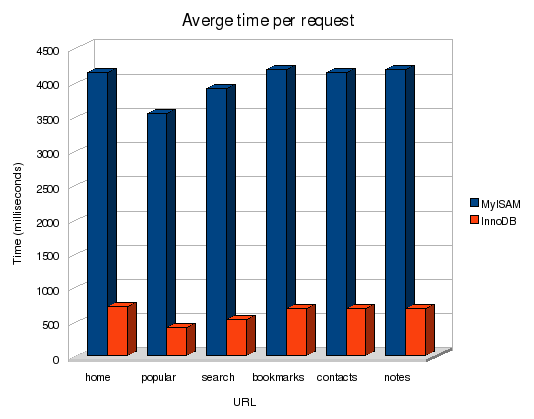
We were now able to get a response time of 0.6 seconds with the system handling 200 concurrently logged in users easily! Although the above graph says MyISAM vs. InnoDB, the graph is the cumulative result of all the changes mentioned above.
You can see what a difference it is in response time for each URL visited by each of the 200 users.
Moreover, CPU utilization, memory utilization and disk contention were within acceptable levels, showing that there is room to grow and that the above configuration can handle more transactions and more users if we need it to.


Comments
Visitor (not verified)
You are great
Wed, 2009/03/18 - 05:12Great. Great. Great.
I always read your article with more and more attention and I always write some notes on my "book fo notes". Tnx again for all of yours articles.
And sorry for my bad English.
M.
--
ziodrupal.net sviluppo siti CMS Drupal.
Visitor (not verified)
Thanks
Sun, 2010/02/21 - 04:38I've found the same problems on one o my site with 2-300 visitors: lock on myisam tables and high number of tmp tables in some module. Thanks for the hints and thans to ZioDrupal that let me found your article.